ExpressionEngine 6 Retires at the End of 2026, Here’s Your Upgrade Game Plan

Josh Conner
If you're running ExpressionEngine 6, the clock is ticking. EE6 hits full retirement at the end of 2026, and after that; no security patches, no bug fixes, no updates.
Your site won't suddenly stop working on January 1st, 2027. But you will be running an unpatched CMS. If your site handles customer data, login credentials, or payment processing, that's a real problem.
We've done a lot of these upgrades, and the pattern is always the same: people wait, something breaks or a security scare happens, and then it's a fire drill. This post is the non-fire-drill version. What's happening, why it matters, and how to get to EE7 on your own timeline.
What's actually changing?
ExpressionEngine 6 launched in December 2020 as a Long Term Support (LTS) release, which meant a 5-year commitment to bug fixes and security updates. That's way longer than EE4 or EE5 got; those versions moved through their support lifecycle in a fraction of the time.
That 5-year window is closing. EE6 entered legacy status at the end of 2025, so right now it's only getting critical security patches. At the end of 2026, even those stop.
After retirement, you're on your own. No security updates. No bug fixes. No official support beyond help with upgrading. If a vulnerability gets discovered in EE6 after that date, it won't be patched.
How does the LTS model work going forward?
ExpressionEngine's version support policy guarantees at least a one-year overlap between LTS releases. The idea is you always have time to transition without running unsupported software.
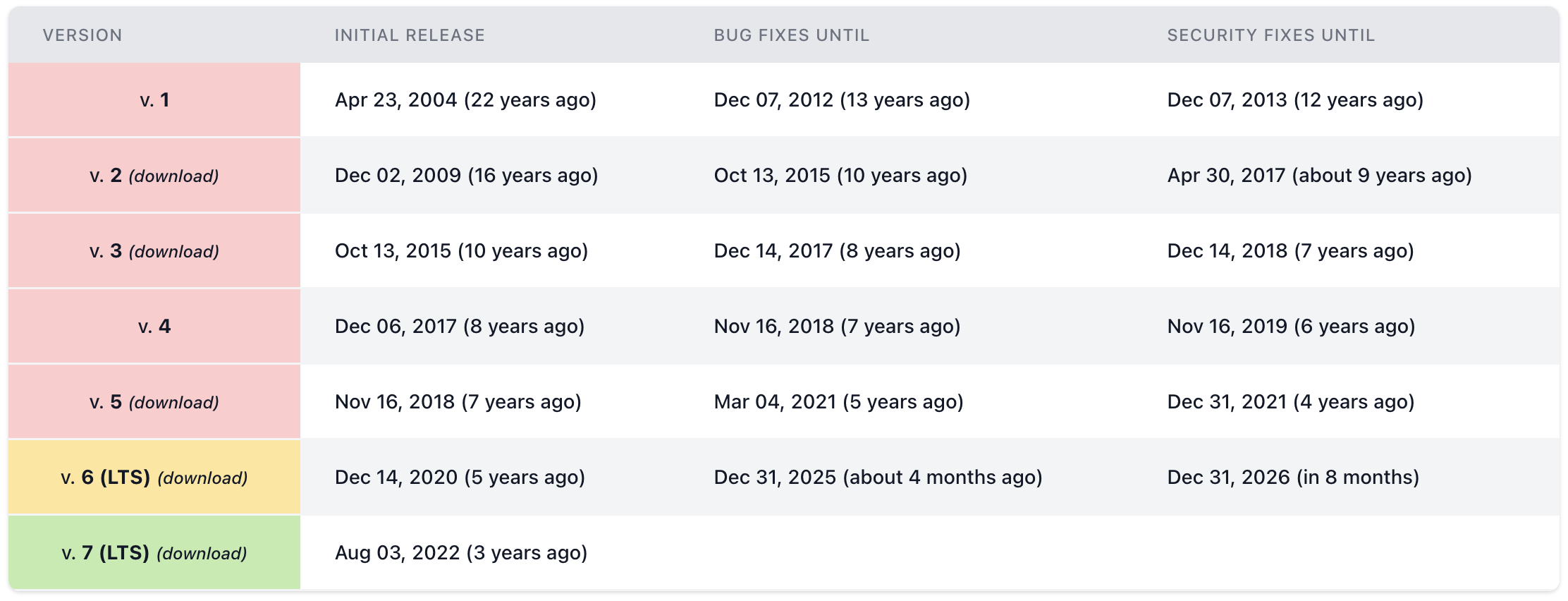
Here's what matters for your planning: ExpressionEngine 7 is also an LTS release. You're not jumping to something that's going to age out in a year, you're moving to another long-term supported version with its own extended window of bug fixes and security patches.
If you went through the EE4-to-EE5-to-EE6 treadmill, this is a different situation. The LTS model means longer stretches between major upgrades. That's good news for most businesses, fewer disruptions, more time on a platform that's actively maintained.
Why this matters more than you might think
We hear this a lot: "My site works fine. Why touch it?"
Fair question. But "works fine today" and "will keep working fine" are two different things.
Security is the big one. Every CMS has vulnerabilities discovered over time, that's just the nature of software. When a version is supported, those get patched. When it's retired, they become public knowledge that anyone can exploit. ExpressionEngine has had documented issues in the past, including remote code execution and PHP injection vulnerabilities. The next one found in EE6 after retirement? That's on you to deal with.
Then there's PHP. Your hosting provider will upgrade their PHP version eventually, many already have. PHP 8.2 and 8.3 are standard now. We've seen EE6 sites break silently after a host upgrades PHP, throwing errors on pages that looked fine the day before. When that happens, you're stuck choosing between rolling back PHP (which your host may not support forever) and doing an emergency upgrade under pressure. Neither is fun.
And the add-on situation only gets worse over time. Third-party developers build for the current version. As EE6 fades out, fewer of them will test against it, and some will drop support entirely. The tools your site depends on will gradually stop getting updates.
What you actually get with EE7
This isn't just a "patch your security holes" upgrade. EE7 genuinely reduces what you have to maintain going forward.
Pro Search and Pro Variables are now part of the core. If you've been running Low Search and Low Variables (and a lot of EE sites are), those are built in now. Two fewer add-ons to maintain, update, and pay for. Your existing Low Search and Low Variables tags still work after upgrading, but you'll want to convert them to the Pro format using EE's Search and Replace tool.
As of EE 7.1, Structure is included too. That's the page hierarchy add-on that half the EE community was running as a separate install. One more dependency gone.
The file manager got a real upgrade, you can now see exactly where any file is used across your site, how many times, and whether it's orphaned. Anyone who's played the "is it safe to delete this image?" game knows how much time that saves.
And EE7 fully supports PHP 8.3, so your hosting provider's PHP upgrades won't break anything.
How to plan your upgrade
Don't wait until November. An EE6 to EE7 upgrade isn't a one-click button; it takes planning, especially if you've got custom add-ons or complex templates.
Step 1: Audit what you've got
Before you touch anything, figure out what you're working with:
- What version of EE6 are you on? (Settings in your control panel will tell you.)
- What PHP version is your server running?
- Make a complete list of your third-party add-ons.
- Which of those are still actively maintained?
- Do you have any custom-built modules or extensions?
This is what determines whether your upgrade is a weekend project or a multi-week effort. A site on EE 6.4 with a handful of well-maintained add-ons? Pretty straightforward. A site on EE 6.1 with ten custom modules? Different conversation.
Step 2: Check add-on compatibility
This is where upgrades tend to get stuck. Go through your add-on list and check EE7 support for each one.
Most actively maintained add-ons already support EE7. Low Search, Low Variables, and Structure are now built into the core, so you can remove the third-party versions after upgrading. The ones to worry about are add-ons that haven't been updated or are no longer maintained. Find those early. They're the ones that will slow everything down if you discover them at the wrong moment.
Step 3: Set up staging
Never upgrade production directly. Clone your site to a staging environment, run the upgrade there, and test everything before you touch the live site. Most decent hosts offer one-click staging these days.
Step 4: Run the upgrade
EE gives you a CLI update command and a browser-based updater. The official update docs walk through both. Back up your database and files before you start.
Step 5: Test everything
After the upgrade runs on staging, go through every page, every form, every dynamic feature. The things that tend to break:
- Search (especially if you're migrating from Low Search to Pro Search)
- Pages with custom field types
- Member registration and login
- Contact forms and form submissions
- Third-party integrations: payment processors, email services, CRMs
Step 6: Go live
Once staging looks good, pick a maintenance window, back up production, and run the upgrade. Straightforward sites usually take a few hours. Complex ones with lots of custom add-ons can take longer.
How long does this actually take?
For a typical site with standard add-ons: about a week from initial audit to going live. Not because the technical work takes that long, but because testing and compatibility checks need time.
Complex sites: custom modules, heavy template logic, outdated add-ons that need replacing. This will take a little longer, plan on a few weeks to do it right.
You've got roughly 8 months. That's plenty of time if you start now. It's not enough if you wait until October.
What if I'm still on EE5 (or older)?
EE5 is already retired. If you're on EE5 or earlier, you're running without security patches right now. The upgrade path goes through EE6 to get to EE7, and the urgency is higher. Don't sit on this.
The bottom line
EE6 has been solid, but its time is ending. The upgrade to EE7 is manageable if you plan it, and the LTS status means you'll be on stable ground for years after. The worst version of this is rushing through it in December because you ran out of time.
Start with the audit. Know what you're working with. Then plan the upgrade on your schedule, not under deadline pressure.
Not sure what your upgrade involves? We do these regularly. Everything from clean EE6-to-EE7 migrations to messy ones with custom add-ons that need careful handling. We'll look at your setup and tell you exactly what you're dealing with, no surprises. Let's figure it out.